How to Choose the Best Web Hosting Platforms?
Choosing among web hosting platforms is not a matter of picking the cheapest plan or the most colorful dashboard. The right choice depends on what you are building, how much traffic you expect, and how comfortably you can manage technical tasks. A small portfolio site may need simple setup and dependable support. An online store may need stronger security, backups, and room to handle busy periods. Details matter.
WordPress co-founder Matt Mullenweg has said, “Technology is best when it brings people together.” That principle fits hosting: a platform should help your site reach people reliably, not become another obstacle. Compare uptime commitments, backup policies, renewal prices, migration assistance, and support hours. Check the fine print, too. A low introductory price can rise sharply at renewal, and “unlimited” resources may still have practical limits.
This guide looks at those trade-offs in plain language. It will help you compare shared, cloud, VPS, and managed hosting, then match features to your needs and budget. I have to admit: a slick control panel can make a weak plan look convincing. It is easy to be distracted by polished screens. Look for clear service terms and test the support team with a specific question before committing. No platform is perfect. The best choice is the one that fits your actual workload—and still makes sense when your site grows.

Define Web Hosting Platforms and Distinguish Shared, VPS, Cloud, and Dedicated Hosting
A web hosting platform stores a website’s files and delivers them to visitors when they enter its address. It also provides computing resources, such as processing power, memory, and storage. Shared hosting places many websites on one server, much like apartments sharing plumbing and electricity. It can suit a small portfolio or local shop with modest traffic. The trade-off is limited control: a busy neighboring site may affect performance. Convenient, but not magic.
VPS hosting divides a physical server into isolated virtual machines. Each site receives a defined portion of resources, giving owners more control than shared hosting.
Cloud hosting runs workloads across connected servers, which can help a site handle traffic spikes, though setup and billing may be harder to predict.
Dedicated hosting reserves an entire physical server for one customer. It offers substantial control and capacity, but requires more technical skill and usually costs more.
A practical choice depends on traffic patterns, budget, and who will maintain the server. Test assumptions with real usage data; these labels do not guarantee identical service, and the distinctions can blur between providers.
One detail is easy to miss: extra capacity is not useful if no one can configure it safely.
Match Hosting Resources to Site Traffic, Using Google’s 53% Abandonment Finding
How to Choose the Best Web Hosting Platforms?
Google reported that 53% of mobile site visits were abandoned when a page took longer than three seconds to load. That finding is not a guarantee for every audience, but it shows how costly delays can be. A visitor on a crowded train may leave before a product image appears. Hosting cannot fix every slow page. Still, it sets a useful performance target.
Choose resources around measured traffic, not a vague promise of “unlimited” capacity. For a small portfolio, shared hosting may be enough when visits are modest and images are optimized. A store facing campaign spikes needs room for more simultaneous requests, with adequate processing power, memory, and bandwidth. Ask how the plan handles sudden surges: does it queue requests, limit activity, or add capacity? Those details matter more than a large storage figure.
Review traffic patterns and test pages on mobile connections. A slow checkout at peak hours deserves more attention than a quiet homepage. Check uptime records, support response times, and whether backups are included. Then retest after changing plans; server resources are only part of page speed. I would avoid sizing everything for a rare traffic peak. But guessing too low can cost visitors, and that trade-off is easy to underestimate.
Compare Reliability: 99.9% Uptime Still Allows 8.76 Hours of Annual Downtime
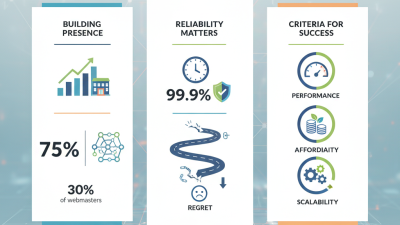
A web host’s 99.9% uptime promise sounds reassuring, but it still permits about 8.76 hours of downtime each year. That time might arrive as one long outage or several shorter interruptions during busy periods. Either way, a checkout page, booking form, or support portal could become unavailable when visitors need it. Reliability deserves more than a headline percentage.
Tips: Ask how uptime is measured and whether maintenance or network failures are excluded. Check the service agreement for remedies, then look for independent monitoring data and a clear incident history. A useful support test: send a technical question before signing and note the response time. Small print matters.
Consider where your visitors live and whether the host offers monitoring, backups, and responsive support around the clock. Ask how quickly staff investigate a server alert, not just whether support is available. Also compare performance during traffic spikes; steady uptime does not guarantee fast pages. I would not treat any percentage as a promise of uninterrupted service. Even careful providers have incidents, and a glossy dashboard can hide inconvenient details.
How to Choose the Best Web Hosting Platforms?
Compare reliability: 99.9% uptime still allows 8.76 hours of annual downtime.
Estimated maximum downtime for a 365-day year, assuming uptime is measured continuously. At 99.9% availability, 0.1% of the year equals 8.76 hours. Actual service-level terms and measurement methods can vary.
Assess Security Features Against IBM’s $4.88M Average Breach Cost in 2024
A web host’s security page can sound reassuring, but check what happens during a real incident. A widely reported 2024 average breach cost of $4.88 million is a useful risk benchmark, not a prediction of your losses. A small business may face lower costs, while downtime, lost records, recovery work, and customer churn can still add up quickly. Ask how the host encrypts stored data, blocks suspicious logins, and alerts customers after a breach. Check whether backups are isolated and regularly tested. A backup that has never been restored is only a promise.
Tips: Request a sample security report. Confirm who can access your files, how quickly support responds, and whether you can export logs. Read the breach-notification terms before signing.
Compare evidence, not just feature lists. Look for independent security audits, clear access controls, and a written incident-response process. Test support with a specific question about restoring a site from backup; note the response time and detail. If the answer is vague, treat that as a warning. No platform removes every risk, and even careful teams miss things. I would revisit the choice yearly, especially after adding payment forms or customer accounts. A low monthly price can become expensive if security gaps interrupt business.
Evaluate Pricing, Support, and Scalability Before Testing and Selecting a Host
How to Choose the Best Web Hosting Platforms?
A good hosting choice balances cost, support, and room to grow. Compare the introductory price with the renewal rate, then check what each fee includes. Backups, email, security features, and traffic limits can change the real cost. Small print matters. A low monthly quote may look attractive until an essential feature requires an upgrade.
Support deserves a practical test, not just a promise on a sales page. Check available contact methods and support hours, then ask a specific question about backups or site migration. Notice whether the reply is clear and relevant. A fast, friendly response is useful, but it does not guarantee expert help when a site is down. I have sometimes judged support too quickly from one good exchange; that is a weak sample, so compare several responses when possible.
Scalability matters even for a small site. Look for a clear path to more storage, memory, or processing capacity, and ask whether changing plans causes downtime. Before committing, test the host with a temporary site. Record page-loading times, try the control panel on a phone, and check how easily you can restore a backup. One test can mislead. Repeat it at different times, and keep notes on both performance and support. These details make comparisons more grounded than feature lists alone.