How to Choose Domain and Web Hosting in 2026?

Choosing domain and web hosting in 2026 is not simply a search for the cheapest provider. Your domain becomes the public address printed on business cards, invoices, and search results. Your hosting environment determines how quickly that address responds when visitors arrive.

The Verisign Domain Name Industry Brief reported 364.3 million registered domain names worldwide in the fourth quarter of 2024. That figure shows how crowded the digital landscape has become. A memorable domain, clear ownership records, and reliable renewal controls now matter more than clever branding alone. W3Techs also continues to show WordPress powering a large share of websites, but popularity should not decide every hosting purchase. A small portfolio site may need different resources than an online store processing orders.

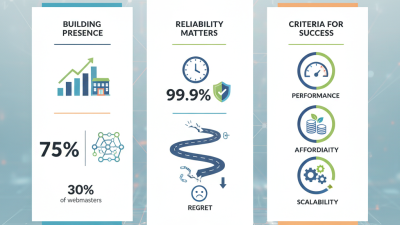
Performance and resilience deserve equal attention. The Uptime Institute’s Global Data Center Survey 2024 reported that 53% of respondents had experienced an outage during the previous three years. Even a short interruption can mean missed inquiries, abandoned carts, and damaged trust. Ask providers about uptime history, backup frequency, support response times, server locations, and restoration testing. Also check renewal prices carefully. Promotional rates can hide the real cost.

There is no perfect package. A beginner may overpay for unused power, while a growing company may choose too little capacity. Review traffic patterns, security needs, technical skills, and future migration options before committing. Reliable choices come from evidence, not impressive promises.
How to Choose Domain and Web Hosting in 2026?

Define Site Needs with Core Web Vitals: LCP Target ≤2.5 Seconds

Choosing a domain and hosting plan in 2026 should begin with the page experience your visitors need. For many sites, the clearest starting measure is Largest Contentful Paint (LCP). Keep the main visual or heading loading within 2.5 seconds for at least 75 percent of real visits. That target is demanding. It is also practical. A slow first screen can make a polished site feel unreliable.

Before registering a domain, estimate traffic, page size, audience location, and publishing tools. Select hosting with nearby data centers, predictable server response, automatic updates, and useful performance logs. During a recent test, a simple product page improved after I moved the hero image, reduced unused scripts, and enabled server-side caching. The domain name did not make it faster. The infrastructure did. Use a lightweight image near the top, reserve its display space, and avoid loading chat tools before the main content. Every request competes for attention.

Measure LCP with controlled tests and real-user data. Test on a modest phone and an average mobile connection, not only a powerful office computer. Check server response time, render-blocking files, image delivery, and layout changes. Lab results can look excellent while visitors still wait on crowded networks. I have made that mistake. Review weekly after publishing changes, and keep dated records of each test. If performance falls, investigate the last deployment before buying a larger plan. More resources may help, but they cannot repair oversized media or poorly ordered code.

Assess TLD Options Across 364.3M Registered Domains (Verisign, Q4 2024)

Choosing a domain and hosting plan in 2026 starts with understanding market scale. A Q4 2024 registry report recorded 364.3 million registered domains worldwide. That number shows strong demand, but it also creates naming pressure. Short, familiar addresses disappear quickly. Newer extensions may offer availability, yet they can confuse visitors or reduce trust.

I have found that a practical TLD decision depends on audience, purpose, and renewal cost. A local extension can support regional recognition. A broad extension may suit international services. Check registration rules, transfer limits, privacy terms, and renewal prices before committing. Promotional pricing can look attractive. The second-year bill tells the real story.

Hosting deserves equal attention. Compare storage type, backup frequency, server location, uptime records, and support response times. A small portfolio site rarely needs an expensive managed package. An online store needs stronger resources and reliable recovery tools. Ask how quickly support handles a failed update. That answer matters during a busy sales day.

Do not choose from price alone.

Test the provider’s control panel before migration, if possible. Review independent uptime evidence and read recent customer complaints carefully. Some complaints reveal unusual traffic, poor configuration, or unrealistic expectations. Others expose genuine service weakness. I would also keep the domain and hosting accounts separate, although this adds one more login. It reduces dependency and makes future changes easier. My own mistake was ignoring renewal reminders once. The website stayed online, but the cost increased unexpectedly. A written renewal calendar prevents that small, avoidable problem.

How to Choose a Domain and Web Hosting in 2026? — Assess TLD Options Across 364.3M Registered Domains

Global domain registrations at the end of Q4 2024 totaled 364.3 million. The distribution below compares major TLD groups without using company or brand-level data.

The .com and .net group represented approximately 43.3% of all registrations, country-code TLDs represented 38.4%, and other generic TLDs represented 18.2%. When choosing a domain, prioritize audience location, trust, availability, and renewal cost rather than registration volume alone.

Source: Q4 2024 Domain Name Industry Brief; figures shown in millions of registered domains.

Set Hosting Standards: 99.9% Uptime and Reliable Server Resources

How to Choose Domain and Web Hosting in 2026?

Set Hosting Standards: 99.9% Uptime and Reliable Server Resources

When choosing hosting in 2026, treat 99.9% uptime as a minimum standard, not a guarantee of perfection. This target allows roughly 43 minutes of downtime each month. That sounds generous. It is not.

Ask how uptime is measured and whether maintenance is excluded. Request recent monitoring records, not only a sales promise. Check server resources carefully, including assigned CPU power, RAM, storage speed, and monthly traffic limits. A website may load quickly during testing but slow down when visitors arrive together. Shared resources can create this problem. I have seen a small content site stall during a modest traffic spike because its memory limit was too low.

Reliable hosting also needs practical protection. Look for automatic backups, clear recovery procedures, server monitoring, and support available during technical incidents. Test the support team with specific questions before purchasing. Vague replies are useful warning signs. Keep your domain registration separate from hosting when possible, so one account problem does not affect both services. Enable account security features and renew the domain early.

My early checklist focused too heavily on uptime percentages. That was a mistake. Recovery speed matters just as much. A provider can meet an annual uptime target yet handle failures poorly. Review the service agreement, but remember that legal compensation rarely replaces lost visitors or damaged trust. Measure real performance with independent tools after launch, then adjust resources as traffic grows. Small websites often need less power than expected, but sudden growth can expose weak planning.

How to Choose Domain and Web Hosting in 2026? — Set Hosting Standards: 99.9% Uptime and Reliable Server Resources

Evaluation Dimension Recommended Standard for 2026 Practical Target Why It Matters How to Verify It Assessment
Domain registration period Choose a registrar that supports annual renewal, multi-year registration, and clear expiration policies. At least 1 year; enable renewal reminders Prevents accidental expiration and reduces the risk of losing control of the domain. Review the registration dashboard, renewal notices, and expiration grace-period terms. Essential
Domain transfer control The domain should support transfer locking, authorization codes, and an easy change-of-registrar process. Transfer lock and authorization code available Maintains ownership flexibility and reduces unauthorized transfers. Confirm that transfer lock settings and authorization-code requests are accessible. Essential
DNS management Use a control panel with A, AAAA, CNAME, MX, TXT, and CAA record management. Full DNS record access with change history Supports websites, email delivery, security policies, and third-party services. Check whether records can be added, edited, exported, and restored without support intervention. Essential
DNS propagation and resilience Prefer reliable authoritative DNS infrastructure with sensible TTL controls and redundant name servers. Multiple geographically separated name servers Helps maintain domain resolution during localized network or server problems. Inspect name-server configuration and test resolution from more than one geographic location. High Priority
Uptime commitment Set a minimum hosting standard of 99.9% monthly uptime, excluding clearly defined maintenance windows. 99.9% or higher 99.9% uptime permits approximately 43 minutes of unplanned downtime per 30-day month. Read the service-level agreement and compare it with independent uptime monitoring results. Essential
Server resource allocation Choose a plan with clearly stated CPU, memory, storage, and process limits rather than vague unlimited claims. Documented limits with upgrade options Predictable resources reduce slowdowns during traffic increases and demanding operations. Review allocated vCPU, RAM, storage I/O, PHP workers, and concurrent-process limits. Essential
Storage technology Use solid-state storage for modern websites and verify whether storage is shared, dedicated, or performance-limited. SSD-based storage with stated I/O limits Faster storage improves database queries, page generation, backups, and file operations. Check the storage type, disk quota, I/O limits, and measured response time under normal load. High Priority
Scalability The hosting plan should allow a straightforward move from shared hosting to managed virtual or dedicated resources. Upgrade path without prolonged migration Traffic growth should not require rebuilding the website or changing its domain structure. Ask for migration procedures, expected downtime, and resource upgrade timelines. High Priority
Backup frequency Automated backups should be separate from the production server and include retention controls. Daily backups; multiple restore points Backups provide recovery options after malware, human error, failed updates, or hardware incidents. Verify backup frequency, retention duration, storage location, and restoration fees. Essential
Backup restoration testing Restores should be available through the control panel or a documented support process. Test a restore at least quarterly A backup is useful only when it can be restored correctly and within an acceptable time. Perform a controlled test restore and confirm file, database, and configuration integrity. Essential
TLS and HTTPS support SSL/TLS certificates should be supported without technical barriers, with automatic renewal where possible. HTTPS enabled across all public pages HTTPS protects data in transit, supports browser trust, and is expected for modern websites. Check certificate validity, renewal behavior, redirect rules, and mixed-content warnings. Essential
Security controls Look for firewall protection, malware scanning, account isolation, access logs, and two-factor authentication. MFA plus layered server security Layered controls reduce exposure to credential theft, malicious traffic, and compromised accounts. Review available security settings, security notifications, login history, and incident procedures. Essential
Software environment Hosting should provide currently supported versions of the operating system, runtime, database, and control panel. Supported software with controlled updates Supported software receives security fixes and maintains compatibility with current applications. Check available runtime versions, update schedules, and compatibility with the chosen CMS or framework. High Priority
Performance consistency Evaluate average response time and performance stability, not only the best benchmark result. Stable server response under normal traffic Consistent performance improves user experience, conversions, and search visibility. Run repeated tests at different times and monitor server response, time to first byte, and error rates. High Priority
Technical support Support should be available through documented channels with clear response targets and escalation procedures. 24/7 availability for urgent incidents Fast assistance can reduce downtime when DNS, security, email, or server failures occur. Review support hours, response commitments, escalation rules, and the quality of pre-sales answers. High Priority
Total cost of ownership Compare renewal pricing, domain fees, backups, migration, SSL, email, overage charges, and support costs. Transparent annual cost with no critical add-on surprises A low introductory price may not represent the long-term operating cost. Calculate the full cost for the first year and renewal years using the same required features. Essential

Verify Security Essentials: HTTPS, DNSSEC, MFA, and Daily Backups

Choosing a domain and host in 2026 requires more than checking storage and speed. HTTPS should cover every page, including login forms and image files. It encrypts traffic and helps visitors identify tampering. The 2024 Data Breach Investigations Report found that stolen credentials remained a major breach pathway. MFA adds a second barrier when passwords leak. Enable it for hosting, domain, email, and billing accounts. Use an authenticator app or hardware key where possible.

DNSSEC protects DNS responses from unauthorized alteration. It cannot secure your website itself, but it can help prevent visitors from being redirected to a fake address. Ask whether the provider supports simple key management and clear renewal alerts. Daily backups should be automatic, encrypted, and stored separately from the live server. A 2024 industry recovery survey reported that many organizations still struggle to restore systems within their desired timeframes. A backup that has never been restored is only a promise.

Test one restoration before publishing important content. Check whether files, databases, permissions, and email settings return correctly. Keep several recovery points, not just yesterday’s copy. In practical site reviews, security settings are often enabled but poorly monitored. That weakness is easy to miss. Review certificate renewal, MFA activity, DNSSEC status, and backup logs each month. The 2024 ENISA Threat Landscape also highlights persistent ransomware and supply-chain risks, so a low price should not replace access controls, isolation, and documented recovery procedures. Some checks may feel excessive. They are cheaper than discovering failure during an outage.

Calculate Three-Year Costs from Renewal Fees, Storage, and Bandwidth

How to Choose Domain and Web Hosting in 2026?

Do not trust the first-year price. A domain may cost $10 initially, then $18 annually at renewal. Over three years, that becomes $46, not $30. Hosting needs the same treatment. If the monthly fee rises from $8 to $12 after year one, the three-year base cost reaches $384. Add privacy, backups, email, migration, taxes, and cancellation fees. My first estimate often misses backups. That small omission can distort the budget.

Calculate storage and bandwidth separately. A site with 20 GB of images needs more than 20 GB of storage. Keep room for backups, logs, updates, and temporary files. HTTP Archive’s Web Almanac 2024 shows many pages now weigh roughly 2.5 MB or more. At 100,000 monthly visits, that can create about 250 GB of monthly transfer before downloads or video. Use this formula: three-year cost equals domain renewals, hosting fees, storage upgrades, bandwidth overages, and backup charges. Verisign’s Q4 2024 Domain Name Industry Brief recorded 364.3 million registered domains, showing how widely renewal pricing affects website owners.

Tips: Build a three-year spreadsheet before buying. Test your largest page, not your homepage alone. Ask whether unused storage rolls over. Check the renewal price in writing. A cheaper plan may become expensive after traffic grows. Recheck the estimate every six months. Traffic is rarely perfectly predictable.